
NATなFusion上のWindowsからホストのPostgreSQLに接続
- 2010/02/24
- murave
MacBookにPostgreSQLを『Mac OS X で PostgreSQL を使ってみよう』(http://lets.postgresql.jp/documents/tutorial/macosx/)を参考にしつつ導入したのですがpsqlで日本語が通らず困ってたりする今日この頃です。ヘルプミー。
とりあえず、VMware Fusiion3上のWindows7にもPostgreSQLを入れたのですが、ServerだけMac側を使おうかなと。サーバーUnix系OS、クライアントWindowsな実環境に近くなりますし。
ってなわけで、Fusion上のWin7がどうなっているやら調べます。ipconfigで見てみましょう。ネットワーク アダプタはNATです。
IPv4 アドレス . . . . . . . . . . : 192.168.249.131
サブネット マスク . . . . . . . . : 255.255.255.0
デフォルト ゲートウェイ . . . . . : 192.168.249.2
ということで、ホストのアドレスは192.168.249.1のようですね。
次、OS X に導入したPostgreSQL8.4がどうなってるのか探ります(ちょい前に導入したもので設定を忘れてまして)。探っていくと、/Library/PostgreSQL/ってなところにインストールされているようです。
設定ファイルを探します。デフォルトだとデータと同じ場所に設定ファイルがありますね。
$ sudo ls -l /Library/PostgreSQL/8.4/data/
total 80
-rw------- 1 postgres daemon 4 1 15 08:41 PG_VERSION
drwx------ 6 postgres daemon 204 1 16 21:07 base
drwx------ 42 postgres daemon 1428 3 18 17:33 global
drwx------ 3 postgres daemon 102 1 15 08:41 pg_clog
-rw------- 1 postgres daemon 3405 1 15 08:41 pg_hba.conf
-rw------- 1 postgres daemon 1631 1 15 08:41 pg_ident.conf
drwxr-xr-x 69 postgres daemon 2346 3 23 00:00 pg_log
drwx------ 4 postgres daemon 136 1 15 08:41 pg_multixact
drwx------ 3 postgres daemon 102 3 23 11:24 pg_stat_tmp
drwx------ 3 postgres daemon 102 1 15 08:41 pg_subtrans
drwx------ 2 postgres daemon 68 1 15 08:41 pg_tblspc
drwx------ 2 postgres daemon 68 1 15 08:41 pg_twophase
drwx------ 4 postgres daemon 136 1 15 08:41 pg_xlog
-rw-r--r-- 1 postgres wheel 16779 1 15 08:42 postgresql.conf
-rw------- 1 postgres daemon 70 3 18 17:33 postmaster.opts
-rw------- 1 postgres daemon 52 3 18 17:33 postmaster.pid
ありました。設定見たり、いじったりしましょう。
まずは postgresql.conf。postgresさんの持ち物らしいので、なりきってGO。
$ sudo -u postgres vim /Library/PostgreSQL/8.4/data/postgresql.conf
で、眺めると、全てのアドレスでlistenはしてるようです。
listen_addresses = '*' # what IP address(es) to listen on;
修正は必要ありませんでした。
次、pg_hba.confを同じくpostgresさんになりきってエディターで開きます。
# TYPE DATABASE USER CIDR-ADDRESS METHOD
# "local" is for Unix domain socket connections only
local all all md5
# IPv4 local connections:
host all all 127.0.0.1/32 md5
# IPv6 local connections:
host all all ::1/128 md5
当然、192.168.249.131からの接続は許可されてません。今回は192.168.249.*からtrust(認証なし)にすることにします。
# TYPE DATABASE USER CIDR-ADDRESS METHOD
# "local" is for Unix domain socket connections only
local all all md5
# IPv4 local connections:
host all all 127.0.0.1/32 md5
# IPv6 local connections:
host all all ::1/128 md5
# Win7 on Fusion3 connections
host all all 192.168.249.0/24 trust
trustな行が追記分です。保存して、PostgreSQLをリスタート。
Fusion 上の Win7 で pgAdmin III を起動して接続してみます。
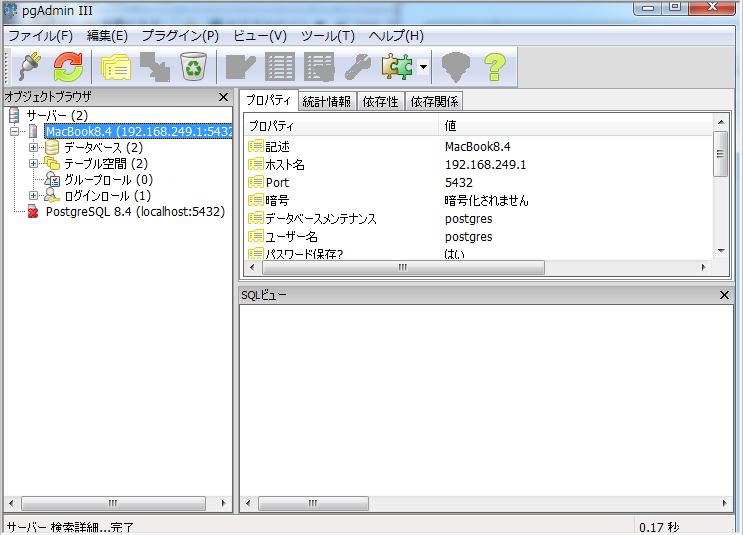
よしよし。