
VagrantでScaleway使うと開発に便利なのでは?という話
- 2017/09/08
- murave
Dockerに傾倒していたので久しぶりにVagrantさわりました。muraveです。
少し前に弊社代表から「ScalewayってクラウドARM使えるし安いし、いいよ!(ネットワーク的に遠くてもいい場合には)」という情報が社内Slackに投げ込まれて気になっておりました。
Scaleaway (https://www.scaleway.com/)
私としてはX86系最安価でも 2Core + 2GB Memory + 50GB SSD + 1public IPv4 という構成で €2.99/month (€1=¥130として¥388.7) の価格性能比に魅力を感じます。
更に調べると詳細には
- VC1Sサーバー(2Cores 2GB Memory): €1/month (€0.002/hour)
- 50GB SSD Volume: €1/month (€0.002/hour)
- 1 public IPv4: €0.99/month (€0.002/hour)
合計 €2.99/month (€0.006/hour)
という価格内訳で(https://www.scaleway.com/faq/billing/)、パッケージ単位での上限が€2.99/monthとのこと。
上限が無くても時間単位で31日間フル稼働で€4.464(¥580.32)ですので、開発でインスタンスの使い捨てを繰り返して上限が無効な場合でもとんでもないことにはならないと思われます。
課金についてあまり気にしなくてもいいというのは精神的に良いです。
そんなわけでVagrantでScalewayをお気軽に使いたいと思います。
Vagrantfile
# -*- mode: ruby -*-弊社ではサーバーにCentOSを使うことが多いのでscaleway.imageにはCentOS7.3のものを指定しています。秘匿したい各種パラメータは.envで与えます。
# vi: set ft=ruby :
#.envにて各種設定(vagrantのpluginとしてdotenvが必要)
Dotenv.load
Vagrant.configure("2") do |config|
if ENV['TARGET'] == 'scaleway'
config.vm.provider :scaleway do |scaleway, override| #要vagrant-scaleway plugin
scaleway.token = ENV['SCALEWAY_TOKEN']
scaleway.organization = ENV['SCALEWAY_ORG']
scaleway.commercial_type = 'VC1S'
scaleway.image = '9103368e-4fab-4243-aa8d-18121796c086' #CentOS 7.3
override.ssh.private_key_path = ENV['SCALEWAY_PKEY']
override.nfs.functional = false
end
else
# ENV['TARGET']はboxの指定
config.vm.provider :virtualbox do |vb|
vb.customize ["setextradata", :id, "VBoxInternal/Devices/VMMDev/0/Config/GetHostTimeDisabled", 0]
end
config.vm.box = ENV['TARGET']
config.vbguest.auto_update = false
config.vm.network :private_network, ip: '192.168.66.10'
end
end
.env
TARGET = 'scaleway'おまけでTARGETにboxを指定するとVirtualBoxで動作するようにしています。
#TARGET = 'centos/7'
# for Scaleway
SCALEWAY_TOKEN = 'your Scaleway token'
SCALEWAY_ORG = 'your Scaleway organization id'
SCALEWAY_PKEY = '~/.ssh/id_rsa'
plugin導入
未導入の場合は導入してください。
$ vagrant plugin install vagrant-scaleway必要情報の収集scaleway.token
$ vagrant plugin install dotenv
トークンScalewayコントロールパネル、ユーザーのCredentialsで作成scaleway.organization
organization idcurl https://account.cloud.online.net/organizations -H “X-Auth-Token: トークン” で確認可能scaleway.commercial_type
サーバータイプCreate a server の画面で確認可能。‘VC1S’: StarterのX86最安価(2Cores, 2GB memory)scaleway.image
OSイメージID。作成されたサーバーについては FROM IMAGE からのリンク先で確認可能。その他設定についてoverride.ssh.private_key_path
ssh接続のための秘密鍵を指定事前にScalewayコントロールパネル、ユーザーのCredentialsから公開鍵の登録が必要override.nfs.functional = false
/vagrantについてnfs連携しようとしてエラーとなるのを防ぎ、rsync連携とする。基本操作vagrant upイメージからサーバーインスタンスを起動。ipはreservedされない(起動中のみ設定される)
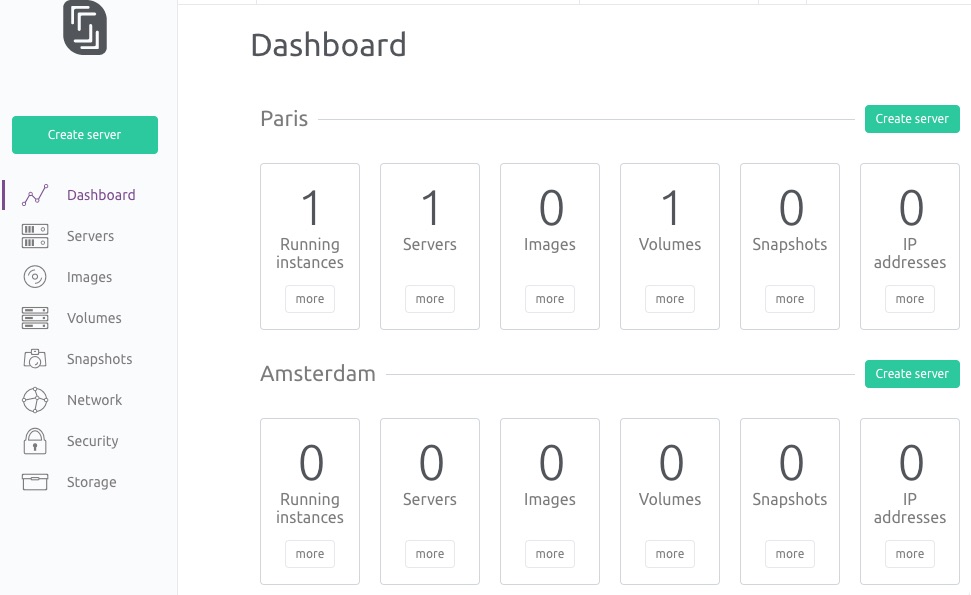
$ vagrant up稼働状況
Bringing machine 'default' up with 'scaleway' provider...
==> default: Creating a server with the following settings...
==> default: -- Commercial Type: VC1S
==> default: -- Image: 9103368e-4fab-4243-aa8d-18121796c086
==> default: -- Name: hugahoge
==> default: Starting the server...
==> default: Waiting for server to become "ready"...
==> default: Waiting for SSH to become available...
==> default: Machine is booted and ready for use!
==> default: [vagrant-hostsupdater] Checking for host entries
==> default: Rsyncing folder: /Users/murave/scaleway/vagrant_only/ => /vagrant

サーバー
vagrant ssh
起動したサーバーインスタンスにsshで接続する。
vagrant ssh-config
ssh接続用情報を表示(IPアドレスの確認等可能)。
$ vagrant ssh-config※ HostNameはサンプル用IPに書き換えてます。
Host default
HostName 192.0.2.1
User root
Port 22
UserKnownHostsFile /dev/null
StrictHostKeyChecking no
PasswordAuthentication no
IdentityFile /Users/murave/.ssh/id_rsa
IdentitiesOnly yes
LogLevel FATAL
vagrant halt
サーバーインスタンス停止。
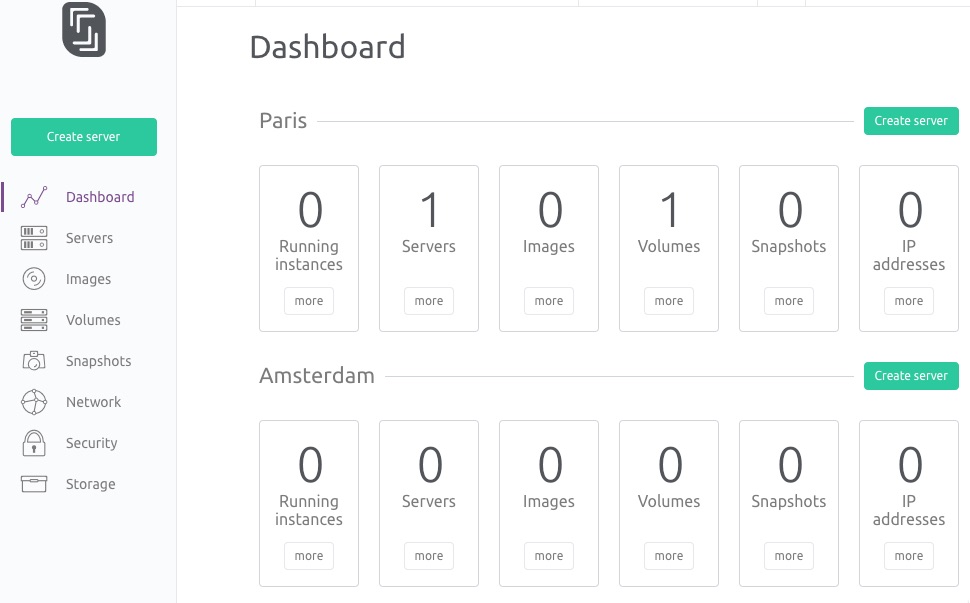
$ vagrant halt稼働状況
==> default: Stopping the server...
==> default: [vagrant-hostsupdater] Removing hosts
停止中でもVolumeについては課金が発生します。一ヶ月止っぱなしで放置した場合でも€1はかかるということですね。
vagrant destroy
サーバーインスタンス破棄。

$ vagrant destroy稼働状況
default: Are you sure you want to destroy the 'default' VM? [y/N] y
==> default: Destroying the server...
==> default: [vagrant-hostsupdater] Removing hosts
halt後にdestroyすると、このようにVolumeは削除されませんので注意が必要です(コントロールパネル等から削除するまで課金発生)
(haltせず)動作中にdestroyし「default: Are you sure you want to destroy the ‘default’ VM? [y/N]」で yとした場合はVolumeも削除されるので、インスタンスを使い捨てする場合にはhaltしないでdestroyしたほうが良いです。