Posts Tagged ‘IronPython’

IronPythonとジェネリックと初期値わたし
- 2013/08/12
- murave
- IronPython
C#勉強会に行って自己紹介で「MVVMパターン用のフレームワーク使ってViewとViewModelはC#、ModelはIronPythonで書います」と言ったら微妙な空気になりました、夏。
muraveです。
というわけでC#とIronPythonを組み合わせて書いてます。基本的に配列や辞書は便利なのでPythonのモノ使ってましたがパフォーマンス・チューニングやっててジェネリック使ったほうがいいところもあるかな、と。
IronPython側でのジェネリックの書き方は知っててたまに使ってたんですが(C#での<>が[]になります)、試したら普通に初期値も与えられるのにちょっと感激。
C#で書くとList<string>の場合
>>> import site
>>> import clr
>>> from System.Collections import Generic as DotNetCollectionsG

>>> dot_l = DotNetCollectionsG.List[str]()
>>> print dot_l
List[str]()

>>> dot_l = DotNetCollectionsG.List[str](['a', 'b'])
>>> print dot_l
List[str](['a', 'b'])
C#で書くとDictionary<string, int>の場合
>>> import site
>>> import clr
>>> from System.Collections import Generic as DotNetCollectionsG

>>> dot_dict = DotNetCollectionsG.Dictionary[str,int]()
>>> print dot_dict
Dictionary[str, int]()

>>> dot_dict = DotNetCollectionsG.Dictionary[str,int]({'a':1 ,'b':1})
>>> print dot_dict
Dictionary[str, int]({'b' : 1, 'a' : 1})
ね♪
helpみたら普通に書いてありました。
>>> help(dot_dict)
Help on Dictionary[str, int] object:

class Dictionary[str, int](object)
 |  Dictionary[str, int]()
 |  Dictionary[str, int](capacity: int)
 |  Dictionary[str, int](comparer: IEqualityComparer[str])
 |  Dictionary[str, int](capacity: int, comparer: IEqualityComparer[str])
 |  Dictionary[str, int](dictionary: IDictionary[str, int])
 |  Dictionary[str, int](dictionary: IDictionary[str, int], comparer: IEqualityComparer[str])
 |
以下略
えらいなぁ。




IronPythonでもRequestsが使いたい
- 2013/03/08
- murave
- IronPython
Requests: 人間のためのHTTP
http://ja.python-requests.org/en/latest/
Pythonの便利なHTTPライブラリ Requests を IronPython でも使いたいわけです。
こんなことを書いているということは素直には使えないわけです。
一応動作してるかな〜、というところまで行けたのでメモしときます。IronPython は 2.7.3 で、Requests は 1.1.0 です。
ポイントは2つ。
まず一つ目。
sys._getframe が必要なので ipy.exe (or ipy64.exe) に -X:Frames オプションを付けて起動する。
オプションはこんな感じで確認できます。
C:\Users\murave>ipy -help
Usage: ipy.exe Usage: ipy [options] [file.py|- [arguments]]
 <前略>
 -X:Frames                Enable basic sys._getframe support
 <後略>
2つ目。IronPython には idna エンコーディングがないので回避する。
requests の models.py で使用されているので取り敢えずコメントアウト。
idnaで検索すると290行目あたりで使用されてます。
#        try:
#            netloc = netloc.encode('idna').decode('utf-8')
#        except UnicodeError:
#            raise InvalidURL('URL has an invalid label.')
netloc = netloc.encode(‘utf-8’).decode(‘utf-8’) に書き換えてみたりもしたのですが馬鹿らしい気がするのでコメントアウトしました。
おそらくこの影響で「ドメインとURLの国際化」は未対応になってしまってますが、動かないよりはいいかと。
C:\Users\murave>ipy -X:Frames
IronPython 2.7.3 (2.7.0.40) on .NET 4.0.30319.18010 (32-bit)
Type "help", "copyright", "credits" or "license" for more information.
>>> import requests
>>> import json
>>> r = requests.get('http://172.16.191.1:8001/api/v1_0/poll/')
>>> r.text
u'{"meta": {"limit": 20, "next": null, "offset": 0, "previous": null, "total_cou
nt": 3}, "objects": [{"id": 1, "pub_date": "2013-03-05T13:51:15", "question": "W
hat\'s up?", "resource_uri": "/api/v1_0/poll/1/"}, {"id": 2, "pub_date": "2013-0
3-06T10:01:35", "question": "\u65e5\u672c\u8a9e\u30c6\u30b9\u30c8", "resource_ur
i": "/api/v1_0/poll/2/"}, {"id": 3, "pub_date": "2013-03-06T13:51:15", "question
": "\u3044\u3044\u3044", "resource_uri": "/api/v1_0/poll/3/"}]}'
>>> res = r.json()
>>> print res['objects'][1]['question']
日本語テスト
>>> payload = {"pub_date": "2013-03-08T20:19:15", "question": "どうかね?"}
>>> r = requests.post('http://172.16.191.1:8001/api/v1_0/poll/', data=json.dumps(payload), headers={"Content-Type": "application/json"})
>>> r

>>> payload = {"pub_date": "2013-03-08T20:19:15", "question": "putは?"}
>>> r = requests.put('http://172.16.191.1:8001/api/v1_0/poll/1/', data=json.dumps(payload), headers={"Content-Type": "application/json"})
>>> r

>>> r = requests.delete('http://172.16.191.1:8001/api/v1_0/poll/1/')
>>> r
と、requests.get、requests.post、requests.put、requests.delete 動いているようです。
YAPC::Asia 2012 LTソン muraveスライド&デモ動画
- 2012/09/30
- murave
- IronPython
- YAPC
- イベント
スライド
デモ動画
PerlイベントでMobiRubyからIronPythonにつなぐネタをやって比較的スベった感じ。
YAPC::Asia 2012 楽しかった! LTはスベったけど!
IronPython Console をもっと便利に(TABによる補完とか)
- 2010/02/11
- murave
- IronPython
IronPyhton の開発環境を構築しています。
お客様に .NET Framework 4.0 が必要な提案をしておりまして、しかも、コンパイルが必要な言語はイマイチ要件にあわない。初めは IronRuby でやろうかと思ったのですが、調べたところ日本語の扱いに不安がある。ここはそろそろ安定しているであろう IronPython かな?というわけ。
さて、本題。インタラクティブシェルを便利にする、ipy.exe おすすめの起動時オプションをご紹介。
どんなオプションがあるのかはこんな感じで確認できます。
C:\Users\murave>"C:\Program Files\IronPython 2.6 for .NET 4.0\ipy.exe" -?
Usage: ipy.exe Usage: ipy [options] [file.py|- [arguments]]

Options:
 -3                       Warn about Python 3.x incompatibilities
 -c cmd                   Program passed in as string (terminates option list)
 -D                       Enable application debugging
 -E                       Ignore environment variables
 -h                       Display usage
 -i                       Inspect interactively after running script
 -m module                run library module as a script
 -O                       generate optimized code
 -OO                      remove doc strings and apply -O optimizations
 -Q arg                   Division options: -Qold (default), -Qwarn, -Qwarnall,
-Qnew
 -s                       Don't add user site directory to sys.path
 -S                       Don't imply 'import site' on initialization
 -t                       Issue warnings about inconsistent tab usage
 -tt                      Issue errors for inconsistent tab usage
 -u                       Unbuffered stdout & stderr
 -v                       Verbose (trace import statements) (also PYTHONVERBOSE=
x)
 -V                       Print the version number and exit
 -W arg                   Warning control (arg is action:message:category:module
:lineno)
 -x                       Skip first line of the source
 -X:AutoIndent            Enable auto-indenting in the REPL loop
 -X:ColorfulConsole       Enable ColorfulConsole
 -X:CompilationThreshold  The number of iterations before the interpreter starts
 compiling
 -X:Debug                 Enable application debugging (preferred over -D)
 -X:EnableProfiler        Enables profiling support in the compiler
 -X:ExceptionDetail       Enable ExceptionDetail mode
 -X:Frames                Enable basic sys._getframe support
 -X:FullFrames            Enable sys._getframe with access to locals
 -X:GCStress              Specifies the GC stress level (the generation to colle
ct each statement)
 -X:LightweightScopes     Generate optimized scopes that can be garbage collecte
d
 -X:MaxRecursion          Set the maximum recursion level
 -X:MTA                   Run in multithreaded apartment
 -X:NoAdaptiveCompilation Disable adaptive compilation
 -X:PassExceptions        Do not catch exceptions that are unhandled by script c
ode
 -X:PrivateBinding        Enable binding to private members
 -X:Python30              Enable available Python 3.0 features
 -X:ShowClrExceptions     Display CLS Exception information
 -X:TabCompletion         Enable TabCompletion mode
 -X:Tracing               Enable support for tracing all methods even before sys
.settrace is called

Environment variables:
 IRONPYTHONPATH    Path to search for module
 IRONPYTHONSTARTUP Startup module
お勧めは、TABキーでのキーワードの補完が有効になる「-X:TabCompletion」、自動でインデントしてくれる「-X:AutoIndent」、コンソールがカラーになる「 -X:ColorfulConsole」あたり。昔はTabCompletion と AutoIndent は設定すると問題もあったのですが(TabCompletion では日本語が文字化けするとか)なおっているようです。
これらのオプション、3年前に買った『オープンソース×Windowsスクリプティング IronPythonの世界』(荒井 省三)という本で知ったのですが、いまだにこの本ぐらいしか参考書がないみたい。
私は、スタートメニューの IronPython Console のショートカットをコピーしてリンク先に上記のオプションを追加したショートカットを作ってます。便利ですよ。
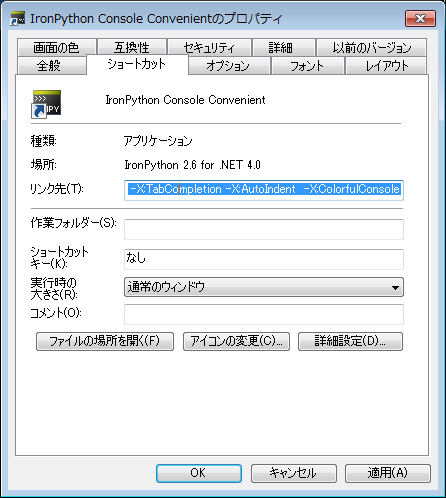
切れちゃってますが、リンク先の内容は「”C:\Program Files\IronPython 2.6 for .NET 4.0\ipy.exe” -X:TabCompletion -X:AutoIndent -X:ColorfulConsole」です。ipy.exe の Path については調整してくださいね。

